Array Data Group
An array data group enables you to display array data elements in a table. A single data group can include a combination of array and non-array data. An array data group is always read only.
There are different ways to handle an OPC array. An OPC server can return an array of data for a single item id. Once returned, it can be displayed as an OPC Array, or it can be interpreted as either a single record or an array of records. If the array of records does not have a timestamp, it is considered a Non-Historical Array and does not receive point processing. If the array of records has a timestamp, it is referred to as an Historical Array and point processing can be performed.
- OPC Array - The data that is returned from OPC server is not altered in any way. The OPC array value does not receive point processing by CygNet because a current value cannot simultaneously contain multiple values. The OPC array data is only displayed in the DDS.
- OPC Record from Array- The values retrieved for one OPC array data group element are interpreted as a simple record, where each item in the array is interpreted as an item in the record. Each item can have a conversion function. Each item in the record can receive point processing by CygNet. This data is displayed in the DDS, but it is also used by other services, like the UIS, VHS, and PNT.
- Non-Historical Array: The values retrieved for one OPC array data group element can be used to provide the values of other data group elements to create a two-dimensional array of records or table where each column is a data group element. Non-historical array data does not receive point processing by CygNet because the data is not timestamped, and a current value cannot simultaneously contain multiple values. Non-historical array data is only displayed in the DDS.
- Historical Array: The values retrieved for one OPC array data group element can be used to provide the values of other data group elements to create a two-dimensional array of records or table where each column is a data group element, and one column represents the timestamp. Historical array data receives point processing by CygNet because a timestamp and a value combine to form a unique historical entity. This data is displayed in the DDS, but it is also used by other services, like the UIS, VHS, and PNT.
|
OPC Array Diagram |
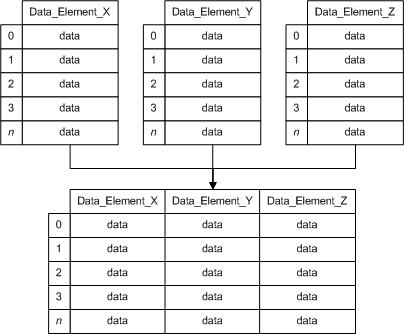
See the following subsections for more information:
- Example – OPC Array
- Structure and Components – OPC Array
- Example – Record from OPC Array
- Structure and Components – Record from OPC Array
- Example – Non-Historical Array of Records
- Structure and Components – Non-Historical Array of Records
- Example – Historical Array of Records
- Structure and Components – Historical Array of Records
- To Create an Array Data Group
For more information, see Device Template Files.
Example – OPC Array
|
<Arrays niceName="Arrays" hasArray="true"> <dgElements secLev="4" type="vrnt"> <N001 desc="RND array r8" itemId="Random.ArrayOfReal8" isArray="true"/> <N002 desc="RND array str" itemId="Random.ArrayOfString" isArray="true"/> <N003 desc="RND r8" itemId="Random.Real8"/> <N004 desc="RND str" itemId="Random.String"/> </dgElements> </Arrays> |
Structure and Components – OPC Array
|
<DataGroup hasArray="true"> <dgElements> <DEID isArray="true"/> </dgElements> </DataGroup> |
Example – Record from OPC Array
|
<Record niceName="Record from array"> <dgElements secLev="4" type="vrnt"> <RawArray desc="Raw data" itemId="Random.ArrayOfReal8" isArray="true" hidden="true"/> <E0 desc="Record element 0" sourceDeid="RawArray" index="0"/> <E1 desc="Record element 1" sourceDeid="RawArray" index="1"/> <E2 desc="Record element 2" sourceDeid="RawArray" index="2"/> </dgElements> </Record> |
Structure and Components – Record from OPC Array
|
<DataGroup hasArray="true"> <dgElements> <DEID isArray="true"/> <DEID2 sourceDeid="<DEID>" index=""/> </dgElements> </DataGroup> |
Example –Non-Historical Array of Records
|
<RunTimes niceName="Event Directory" forceSave="true" hasArray="true" maxCnt="3"> <dgElements secLev="4" isArray="true"> <RawData desc="Raw data" type="ui2" itemId="RunTimeArray" recordItems="2" hidden="true"/> <IdNum desc="ID" type="ui2" sourceDeid="RawData" index="0"/> <RunTime desc="RunTime" type="ui2" sourceDeid="RawData" index="1" units="sec"/> </dgElements> </RunTimes> |
Structure and Components – Non-Historical Array of Records
|
<DataGroup hasArray="true"> <dgElements isArray="true"> <DEID recordItems=""/> <DEID2 sourceDeid="<DEID>" index=""/> </dgElements> </DataGroup> |
Example –Historical Array of Records
|
<EvtDir niceName="Event Directory" forceSave="true" hasHistory="true" maxCnt="3"> <dgElements secLev="4" isArray="true" type="ui4"> <RawData desc="Raw data" itemId="Dynagraph.EventDirectory_P" recordItems="5" hidden="true"/> <IdNum desc="Event ID" sourceDeid="RawData" index="0"/> <Reason desc="Code" dMask="0x%04X" sourceDeid="RawData" index="1"/> <DateTime desc="Timestamp" type="r8" sourceDeid="RawData" index="2" cvtF="TimeSeconds" sourceType="ui4" baseTime="1/1/2000"/> </dgElements> </EvtDir> |
Structure and Components – Historical Array of Records
|
<DataGroup hasHistory="true"> <dgElements isArray="true"> <DEID recordItems=""/> <DEID2 sourceDeid="<DEID>" index=""/> <DateTime desc="Timestamp" type="" sourceDeid="<DEID>" index="" /> </dgElements> </DataGroup> |
- Using a text editor or XML editor, open the device template file to which you want to add an array data group. You might need to extract the device template file from a Device Definition Service (DDS) in order to edit it.
- Define a DataGroup element for the applicable data group. Add the attribute hasArray or hasHistory and set its value to true.
- Define a dgElements element that includes all required data group elements.
- For each array data group element, add the attribute isArray and set its value to true.
- If this data group includes a historical array, include a DateTime element to supply timestamps.
- Save your edits.
- Validate the template, then load it to the applicable DDS. See CygNet Device Template Manager Utility.
- From the applicable DDS, poll the affected device to test data retrieval and confirm the data group works as expected.


